

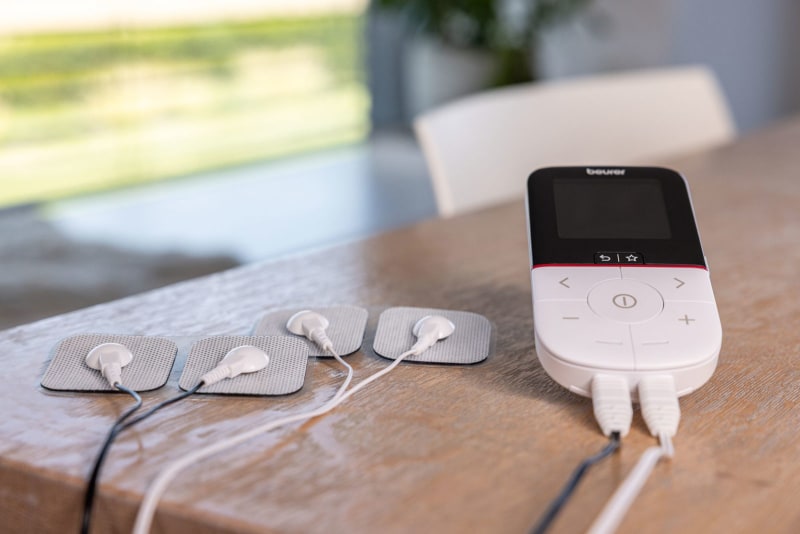
Yes, TENS pads can be cleaned, and it is worth doing: well-cared-for pads stay sticky for as long as possible. For the EM 59 Heat, you carefully clean the gel pads under lukewarm running water and pat them dry with a lint-free cloth. Before you do this, unplug the connection cable from the device, and once they are dry, stick the electrodes back onto their carrier foil. You replace the EM 59 Heat's gel pads with new ones after 20 uses at the latest. Our Beurer Digital TENS/EMS device with heat function comes with 4 electrodes including gel pads. We offer matching replacement sets for the EM 59 Heat, the EM 49 and the EM 56. Here you can find out how to care for and store your pads properly, and how to tell when you need new ones.
Can TENS pads be cleaned?
During a TENS application, electrodes are placed on the skin over the painful area.A TENS devices can be used to support pain treatment. Before applying them, note the contraindications and warnings in the instructions for use of your device.B For the electrical impulses to reach their destination, the contact between pad and skin has to be right. With self-adhesive electrodes, the adhesive also serves as the interface between electrode and skin, and surface electrodes need to be smooth and lie firmly against the skin.C
This is exactly where care comes in. Whether and how you can clean TENS pads depends on the model; what matters is what the instructions for use of your device and the electrodes say. For the gel pads of the EM 59 Heat and the adhesive electrodes of the EM 49, lukewarm running water and a lint-free cloth are enough. Multi-use electrodes are reusable and are replaced once they show wear; the manufacturer's specifications on shelf life and period of use are decisive here.C Cleaning keeps the adhesion going for as long as possible, but it does not replace a change of pads.
How often TENS pads can be used
How long a pad lasts depends on the device, so it is worth checking your own model. For the EM 59 Heat, you replace the gel pads with new ones after 20 uses at the latest. The same limit applies to the EM 89 Heat's gel pads; see also the instructions for use of the EM 89 Heat on this. If they lose their stickiness sooner, you replace the gel pads straight away. You should only use the device again with new pads, because uneven stickiness could lead to skin injuries. You will find the details on care and replacement in the instructions for use of the EM 59 Heat.
For the Digital TENS/EMS device EM 49, there is no fixed number. How often you can use the adhesive electrodes depends on the environment and your skin. If the electrodes no longer stick to your skin properly during use, you replace them. Read the current instructions for use of the EM 49 on this; if you keep them with the pads, you will have them to hand when swapping them.
In Germany, the directory of medical aids of the statutory health insurance also provides a benchmark. Under this directory, reusable electrodes must be usable at least 15 times when used as intended.C This figure is a minimum requirement for electrodes listed in the directory, not a lifespan for your pad. For your pads, the information for your specific device always applies. It is completely normal for them to become less sticky over time with regular use.
How to clean TENS pads properly
Cleaning only takes a few minutes if you do the steps in the right order. For the gel pads of the EM 59 Heat, the steps are as follows:
- First unplug the connection cable from the device before the pads come into contact with water.
- Carefully clean the gel pads with a damp, lint-free cloth under lukewarm running water.
- Then pat them dry with a lint-free cloth instead of rubbing.
- Once they are dry, stick the electrodes back onto the gel pads' carrier foil.
For our EM 49, you have two options. You carefully wipe the adhesive electrodes with a damp cloth, or you rinse their underside under the tap and pat them dry. Here too, unplug the connection cables from the electrodes first.
The control unit itself does not go under the tap. You clean it after use with a soft, slightly damp cloth and never immerse it in water or other liquids. If you’re new to TENS, our guide on where to place TENS electrodes explains where to position them for your symptoms.
What damages the adhesive layer of the pads
The adhesive layer is more delicate than it looks. You should not use chemical cleaners or abrasives, as they can make the pads less sticky. Caring for the pads therefore starts before use, with your skin.
Before each use, you clean your skin and avoid skin balms and care oils. Shaving can make the gel pads last longer.
Applying greasy creams or ointments to your skin beforehand is not recommended. This wears out the gel pads much faster, and unpleasant current peaks can occur. You apply the electrodes to clean, dry and grease-free skin, not to open wounds, irritated skin or scars.
You can also protect the pads when you peel them off. You should remove the protective film carefully and slowly. Make sure that the self-adhesive gel pad is not damaged, as damage or unevenness on the gel pad can cause skin irritation.
Attach the gel pads carefully to the electrodes. Gel pads attached at a slight angle have no effect on how the device works; however, their edge must not extend beyond the electrode. You should never alter the electrodes, for example by cutting them. This leads to a higher current density and can be dangerous.
How to store electrodes correctly
You can also do a lot to help your pads last longer between uses. With the EM 59 Heat, do not bend the connection cables and electrodes sharply. After use, stick the electrodes back onto the backing film of the gel pads. Store the device in a cool, ventilated place. The storage conditions of the EM 59 Heat are 0 to 40 °C at a relative humidity of no more than 90 percent.
With the EM 49, you also disconnect the connection cables from the electrodes for storage. Here too, the electrodes go back onto the backing film and the device is stored in a cool, ventilated place. You should therefore not throw the backing film away, as it is to the pads what a case is to a pair of glasses.
Can someone else use your electrodes?
The short answer is no. For hygiene reasons, the electrodes may only be used on one person.
If two people in a household want to use the same device, each of them therefore needs their own pads. For hygiene reasons, electrodes and gel pads may only be used by one person. If the device is to be used by another person, also follow the notes on reuse and reprocessing in the relevant instructions for use. Store each person's pads on their own carrier film.
How to tell when TENS pads need replacing
TENS pads should be replaced if they no longer stick securely after cleaning. Switch the device off if an electrode comes loose during the application. With the EM 59 Heat, you replace the gel pads immediately as soon as their adhesion starts to fade, and you only use the device again with new gel pads. For the EM 59 Heat, the fixed limit from the section on period of use also applies, even if the pads are still sticking.
Worn gel pads can lead to skin irritation, because the current is no longer distributed evenly over the whole surface. That is why you should replace them in good time. The same applies to the adhesive electrodes of the EM 49. When they wear out, skin irritation can occur, as the current is no longer distributed evenly over the entire surface.
That is why you should also keep an eye on your skin. If the skin in the treatment area turns red, stop the treatment immediately and wait until your skin has returned to normal.
If the skin irritation persists and itching or inflammation occurs, you should seek medical advice before using the device again. You may have an allergy to the adhesive surface. Using the device does not replace consulting a doctor or medical treatment.
Which replacement set fits the EM 59 Heat, the EM 49 and the EM 56
Once the pads are worn out, you can quickly find the right replacement part for your device. For the EM 59 Heat, 8 gel pads in the 45 x 45 mm size are available as a replacement part. Our replacement set with gel pads EM 59/89 Heat contains 8 pads. It is intended for use with the Beurer Digital TENS/EMS device EM 59 Heat and the EM 89.
The EM 59 Heat itself is a Digital TENS/EMS device with a heat function. It has 2 channels, 4 electrodes and 64 pre-programmed applications, plus a heat function with 2 heat settings and an electrode position indicator. It runs on a rechargeable battery, is a medical device, and it comes with a 5-year guarantee.
The EM 59 Heat is the test winner in the F.A.Z. Kaufkompass TENS device test on faz.net (as of 30.6.2026). The test examined 26 devices, and the EM 59 Heat took 1st place. In the practical test, the adhesive pads were applied and peeled off twenty times.
The small 45 x 45 mm electrodes are available for the EM 49 in a set of 8. This replacement set is intended for use with the EM 40, EM 41, EM 49 and EM 80. The EM 49 comes with 4 adhesive electrodes in exactly this size. For larger areas, the large 50 x 100 mm electrodes are also available. This replacement set with 4 pads is intended for the EM 41, EM 49, EM 56, EM 80 and EM 95. This means it also fits the Digital TENS/EMS EM 56, which likewise works with 2 channels and 4 electrodes and shows you the electrode position. The EM 49 has 2 channels, 4 electrodes and 64 pre-programmed applications. It runs on 3 AAA batteries, and it also comes with a 5-year guarantee.
For an overview of all the sets, see which replacement set fits which device. For more on sizes, shapes and connectors, see our guide to buying TENS electrodes. If you’re still deciding between the two devices, see our comparison, Beurer EM 49 or EM 59 Heat: which TENS/EMS device suits you. You will find all models in the overview of our TENS devices and in the Pain therapy section. You can go straight to the device with the gel pads from this guide by clicking view the EM 59 Heat.
Frequently asked questions
Can you clean TENS pads?
Whether and how you can clean TENS pads depends on the model. Follow the instructions for use of your device and the electrodes. You clean the gel pads of the EM 59 Heat and the adhesive electrodes of the EM 49 carefully under lukewarm running water or with a damp, lint-free cloth and then pat them dry. First detach the connecting cable, and once the pads are dry, stick them back onto their carrier film.
How often can you use TENS pads?
With the EM 59 Heat and the EM 89 Heat, you replace the gel pads after at most 20 applications. With the EM 49, the number depends on the ambient conditions and your skin; you replace the adhesive electrodes as soon as they no longer stick properly.
How should I store electrodes correctly?
After use, stick the electrodes back onto the carrier film. Do not bend the cables and electrodes sharply, and store the device in a cool, well-ventilated place.
May someone else use my electrodes?
No, for hygiene reasons the electrodes may only be used by one person. Everyone in the household needs their own pads.
How do I know that they need replacing?
If the pads no longer hold firmly after cleaning, they need to be replaced. With the EM 59 Heat, the change is due after at most 20 applications, even if the pads are still sticking.


